Showing posts with label graphic design. Show all posts

Wednesday, December 16, 2009

Turn your MAC laptop trackpad into a drawing tablet


Want to buy a drawing tablet for your MAC notebook for your graphic design, but cant afford one? then this may be the solution for your problem. Pogo Sketch Stylus, from Ten One Design, this product can make any touchscreen or touch-pad that can take gestures, act like a stylus so this means you dont have to use your fingers and save's you a big bucks.

In my other post this is like the wacom bamboo pen and touch tablet. this can make your designing much easier and faster for it it like a pencil, making it a low-cost alternative to a drawing tablet. This means that graphic artist of the design may be able to go about drawing and writing naturally in illustration programs without the need for a costly tablet.

source: tenonedesign.com/stylus.php

For more topics like this visit DESIGNERSLANDMARK

Sunday, December 13, 2009

my first 3d model

I was browsing through my designs and i came to my first 3d model, the inspiration about this was a tutorial in illustrator (i just forgot the website), the tutorial was all about creating a basket of fruits, one effect illustrator can do is that it can act as a 3d vector (rotate effect), so i was thinking why not make the real 3d for it.

hope you like it.

software used:
swift3d v5

Read more from here DESIGNERSLANDMARK

Tuesday, December 8, 2009

zbrush 3.5 r3 new update


If you could still remember my post with the release of zbrush 3.5 3r2,
3d software, a new and quick update from pixologic again "Zbrush 3.5 r3".

ZBrush 3.5 aims to bring you creative freedom and an end to technical constraints. With new features like ZSpheres II, ZSketch, Quick Sketch, Surface Noise, Planar brushes and many other new enhancements, your art will reach a whole new level.
With this new version, we have refined and added to ZBrush's already exceptional toolset, improving the natural traditional media feel that ZBrush is famous for. We've made it easier than ever for you to create organic characters, mechanical objects, environments or product designs. If you are an illustrator, VFX or video game artist, product designer or just a hobbyist passionate about 3D, ZBrush is for you!
We invite you to discover the main new additions to ZBrush 3.5 - enhancements that are the foundation for the upcoming ZBrush 4! In addition, both versions are free upgrades for all registered ZBrush users!

source: Pixologic
I'm just disappointed with pixologic, why don't they just wait for the release of zbrush 4? If you could read the last part, we will be expecting another update from them. but still as a 3d designer im still excited about this.

For more topics like this visit Designerslandmark

Sunday, December 6, 2009

free 3d terrain creator


"Summer, winter and Spring Mountain"

want to make a realistic land or terrain for your 3d design or for your game development?

Then terragen 2 is for you, a free land terrain creator that is easy to use and generate, and its free download and a pro version.

Terragen 2 is available both as a free download and as a purchase option for Terragen 2 Deep Edition. The free version may only be used for non-commercial purposes and is limited in the following ways:
Render Size Maximum: 800x600
Render Detail Maximum: 1.0
Antialiasing Maximum: 3
Number of Rendered Populations: 3
You may purchase a commercial license which will remove these feature restrictions. Your license will cover the final release of Terragen 2 Deep Edition and any minor updates (2.x versions), not just the Beta. Please see our Terragen 2 purchase page for details on pricing and purchase options.

The Terragen 2 downloads on this page are for the free non-commercial edition. They may also be used by commercial users on a 30-day trial basis only.
System Requirements:
PC
Any version of Windows 2000, XP, or Vista
Minimum 1GB of RAM - 4GB recommended
Minimum 1Ghz CPU - 2Ghz Dual Core recommended
Mac
OS X 10.4 or newer
PPC or Intel - TG2 is a Universal Binary
Minimum 1GB of RAM - 4GB recommended
Minimum 1Ghz CPU - 2Ghz Intel Dual Core recommended

Source: planetside.co.uk

download here :Download

I recommend this 3D software for graphic design.

For more topics like this visit Designerslandmark

Monday, November 30, 2009

Mud Man in Zbrush

mudhead

Because of the post i made about the new release of ZBrush 3.5r2, i remember the first project i made way back 2008 using that 3d software, but didn't got the chance to finish it. As I'am just a beginner, plus the topology of the face is not yet that right to form the proper placement.

as a 3d designer, i suggest, if you want to study Zbrush 3.5r2 sculpting first learn proper topology, a Wacom bamboo tablet (not necessarily but most zbrush user do use this) and patience. Good luck! ^_^

This is also nice to integrate with Adobe Photoshop CS5 for texturing.

OT: you will see wheay as the sig for the work, its my screen name.

For more topics like this visit Designerslandmark

Sunday, November 29, 2009

8 Useful Online Color Mixer

Having trouble finding the proper color, hex code/value for your graphic design and 3d model? I want to share my 8 useful color mixer website i found online.

If you just want to know the hex value of a single color that's not complicated fast and easy this site it for you. Just move the slider and find the color you want or just type the value in the text box. that easy.

A color schemer with suggestion close to your color
selection. Just Enter an RGB or HEX value, or click on the Color Palette.

3.) Color Scheme Designer
Enhanced scheme creation system, with color wheel interface and adjusting scheme for mono, complement, triad, tetrad, analogic and accented analogic color wheel combiner.

Brows color palettes, or create your own. Adjust, mix and blend to your content in 3d rotating color wheel. how cool is that!


5.) Kuler
Adobe has never forget to surprise us with its creative ideas for graphic designers like us, you can select from a wide variety of color ideas, mood and schemes.

This online color mixer has the power to select color that matches from your image of choice just by entering the Url , from Dull or vibrant color, with its hex value.

7.) Colr
This one is the same with degraeve, where you can get color from images but this one has the integration with flicker photos, url images and you can send pictures from your computer as well.

Just like from Adobe Kuler, whether for ad campaigns, product design, or in architectural specification, compare color palettes, submit news and comments, and read color related articles and interviews.

Most of the website can be save for your design software's palette like Adobe collection,

For more topics like this visit Designerslandmark

Wednesday, November 25, 2009

Create multiple objects with equal spacing in sketchup 6 and 7

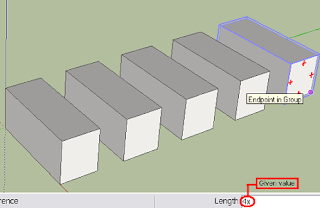
In this 3d tutorial i will show you how to create multiple copy of your object with given equal spaces in sketchup, for your 3d model

1.) Open Sketchup. (Im using SU 6 and SU 7, dont know if it works in older versions)
2.) Create an object, ill be using a box for this example.


3.) Select / highlight your object. (i group my object in this example) (note: it doesn't matter if you group it, make it component, or leave it as is.)


4.) Grab your move tool and create a copy of it by how far you want the distance per-objects. (i use 5' as my distance)


5.) After you have specify the distance, type in the value of how many copy including the the last objects including "x", with x means multiply by. don't forget to put the "x". (ill be using 4 as my example.) (note: im poor with math but this is how the computation happens, 4x1+1. which 4 as the Assign value.)


That's it, you made it. as simple as that. Hope this help and understand it to. Good luck.
___________________________________________________
additional information, if you want to create a horizontal alignment or any directions, in move tool(4), if you assign it vertical, horizontal or diagonal it will still copy the same exact position you assign to it. (pls. see example)


For more topics like this visit Designerslandmark

Flash cs5 viper (beta) review


After flash cs4, Adobe has announce the release of the latest adobe flash cs5 viper (beta) professional, the unveiling was held in Adobe max 2009, “the beta download will be available before the end of the year.” ¬Adobe labs.


What’s coming in Flash Professional CS5 Some of the new features include:

• Applications for iPhone — Publish ActionScript 3® projects in Adobe Flash Professional to run as applications for iPhone.

• New text capabilities via the Text Layout Framework (TLF) — Get unprecedented text control and creativity with projects created in Flash. Advanced styling and layout, including right to left text, columns, and threaded text blocks, let you work with text in Flash like never before.

• XML based FLA files — Manage and modify project assets using source control systems and enable teams to easily collaborate on files.

• Code Snippets panel — Choose prebuilt code that can be injected into projects to increase interactivity and also reduce the ActionScript 3 learning curve.

• Flash Builder™ integration — Use Adobe Flash Builder software as your ActionScript editor within projects in Flash.

• Improved ActionScript editor — Improve productivity with custom class code hinting and completion.

Source from: Adobe labs

iPhone users and Game/Apps developer would be happy to hear that Adobe Flash CS5 viper (beta) has integrated with iPhone for application and games, more jobs are coming. combining it with the power of the upcoming adobe Photoshop cs5


For more topics like this visit Designerslandmark

First things first

listing the things I want to accomplish and the things you will be expecting, this will also serve as my online diary. (designers point of view)
1.) My graphic arts, animation, other designers arts
2.) Web design/templates
3.) Free Tutorials
4.) Free stuff
5.) Informative Sites i have visited.
6.) Latest software and updates
7.) Question and answer for your comments.

This blog is created very much for sharing my design graphics and as storage for my files as well. ^_^ and showing other graphics artist work (hope they allow me). The coolest part about this blog is i share my tips and tricks on how i did that graphics (you can share your thoughts also), plug-ins, software’s and informative sites. This blog also includes the latest software’s for graphic artist and updates. And the best part it that you can have a chit chat with me for your question, so we can interact if you have any comment and suggestions.